Tuesday, September 2, 2014

CHROME'S USER DROP-DOWN IS NOW AVAILABLE IN CHROME BETA

Not that long ago I mentioned that Chrome Canary had added a drop down that would allow you to easily switch users in Chrome. Not every feature in the Canary version makes it to Beta and on to the full release version. However, I'm glad to see that this feature is now in the Beta version of Chrome.

This is such a useful feature, I can't imagine Google not incorporating it into the full release version. If you've been hesitant to try Chrome Canary, you should at least give Chrome Beta a try. It is more stable than Canary, and you still get new features quicker.

Just a reminder of why attorneys should like this: it makes it much easier to switch between your personal Google account and your work Google account. 

Monday, September 1, 2014

YOU SHOULD GET PUSHBULLET

If you've been following this blog at all, it will come as no surprise that I'm a bit of a tech nerd. In my office, I've got two computer monitors, my linux box, the tablet, phone, and smart watch. I've got screens everywhere it seems.

Getting all of these screens and devices to play together without flipping from one device to another is critical. Pushbullet is a wonderful app for the phone, tablet, and extension for Google Chrome that helps tremendously.

After installing the app in all three locations, I can quickly and easily move from one device to the other. Let's say I've taken a picture on my phone that I want to see on my computer. I can send it from my phone to the computer using Pushbullet wirelessly.

I can also enabling a universal clipboard. So, if I copy something on my phone, when I go to my tablet and hit paste, it will paste whatever I had just copied on my phone.

The thing I have been enjoying the most is the ability to receive phone notifications on my desktop. They pop up in the lower right corner, somewhat similar to a notification you receive from Outlook when you receive email.

Why is this so great? When someone sends me a text, I can simply reply to the text using my computer. No need to get out the phone or use the watch. I can quickly respond without changing devices.

I highly recommend this absolutely free app.

Friday, August 29, 2014

IFTTT FOR ATTORNEYS: CREATE A PHONE LOG

IFTTT is a mobile app that will automatically do something in one app if something else happens in another app. For example, when this post gets published, IFTTT will automatically create a tweet in twitter with the post title and a link for me. All without me ever actually opening Twitter.

IFTTT isn't limited to Twitter and Blogger. In fact, there are dozens of services that IFTTT can cause to work together. I tend to think of IFTTT as a scaled down, but free and easier to learn version of Tasker. I use them both, each for different tasks.

IFTTT is useful in general, but I think there are some recipes that can be of particular use to attorneys. As I come across them, I'll write about them here. 

Today's tip is how to use IFTTT to keep track of your cell phone calls by creating and keeping an automatic call log in Google Drive. This may be of more use to solo and small firm practitioners particularly, but anyone that uses a cell phone for client communications can benefit.

In IFTTT, you will need to make sure that you enable the Google Drive and Android Phone channels. Next, create a new recipe and click on the "if" statement.


Next, choose "Android Phone Call" from the list along the top. Within that, click on the plus sign next to "Any phone call placed".


Then, click on the plus for the "Then" statement.


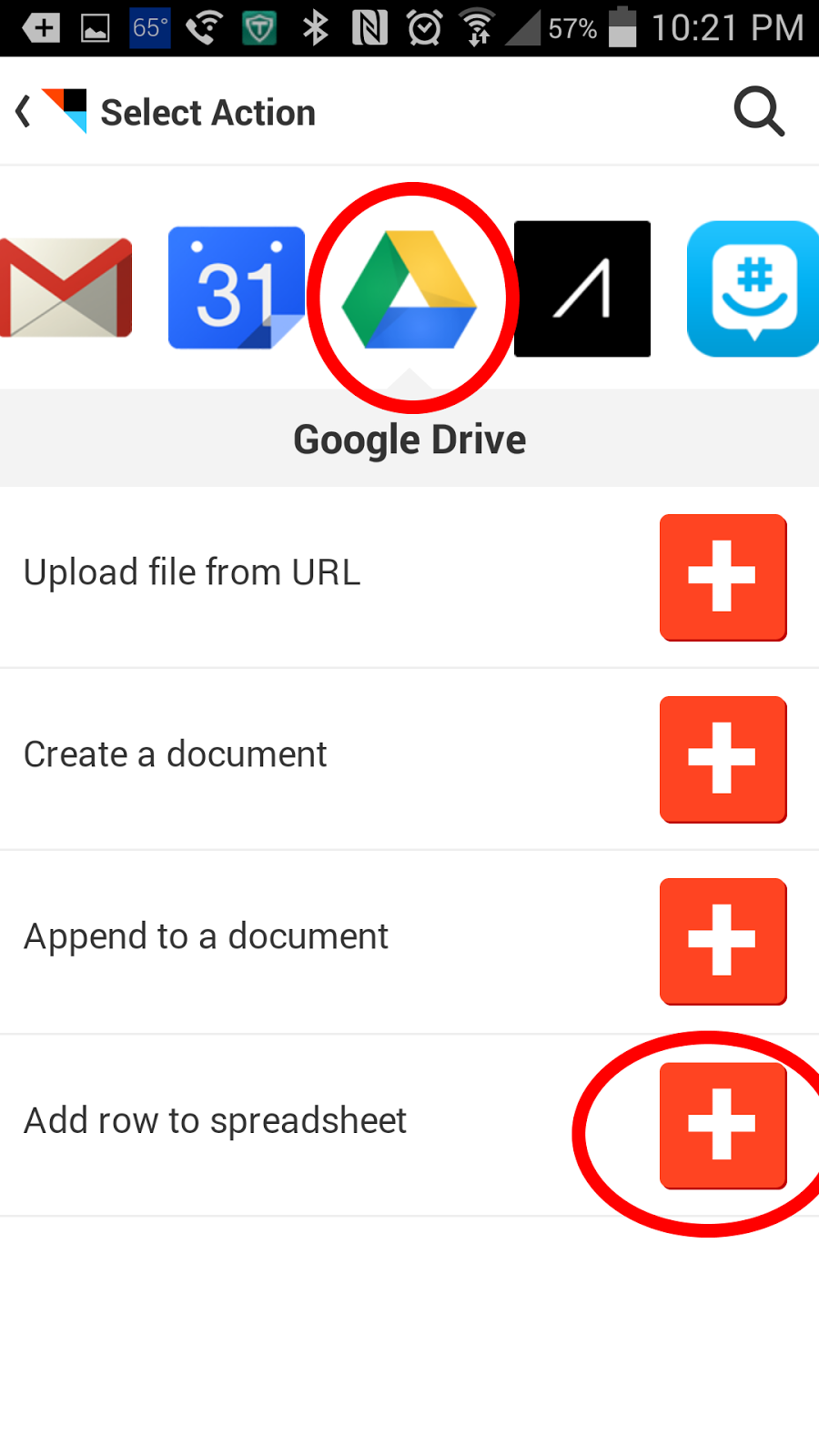
Then, scroll and find Google Drive. Click on it, and then click on "Add row to speadsheet".


What this will do is create a new spreadsheet named "Phone call" in your Google Drive account in a folder called IFTTT. It will have four columns that state when the phone call was made, what number was called, who was called, and how long it lasted. You can tweak some of this in the edit recipe menu.


How is this useful for an attorney? If you make several phone calls on the road, you can quickly enter your time into your billing or case management software by referencing a single spreadsheet. The only thing you would have to do is remember what the substance of the call was. This is much easier than going through your phone's call log an into each entry to see when the call occurred and how long it lasted for billing purposes.

Wednesday, August 27, 2014

NEED AN ULTRA LIGHT BROWSER? TRY MIDORI

Previously, I mentioned that I had a 10 year old laptop that shipped with Windows XP but had no hope of running Windows 7 or 8. So, instead of sending it out to pasture, I installed Linux.

It runs Linux without any problem, but its relatively small amount of RAM struggles with browsers like Chrome (it's actually Chromium) and Firefox. These browsers are great and offer a lot a really useful features. But, they are memory intensive for an older laptop like my Linux box.

So I began searching for a stripped down browser that would let me navigate the web but without all of the bells and whistles. Midori is a true unitasker as opposed to the Chromes and Firefoxes, which want you to stay in them to do everything.

Don't get me wrong. There isn't anything wrong with Chrome or Firefox wanting to do everything for me. I still use them on my newer machines. They just aren't as helpful on older machines.

So, if you find your internet experience to be too sluggish or you just want a browser that is a browser and nothing more, give Midori a try.

To get Midori for windows, go to their website and click download.

If you're running Debian Linux, from the terminal, just type: sudo apt-get install midori

Tuesday, August 26, 2014

SMARTWATCHES - ONLY BUY IF YOU WANT A SECOND SCREEN AND NOT A SECOND PHONE

Having spent several weeks with the Samsung Gear Live Smartwatch, I have been asked several times now about it. The first question is, predictably, along the lines of "is that one of those smart watches?" The second is usually, "do you like it?" After some back and forth about why I like it, the big one comes: "Should I get one?"

Early on I would deflect and tell people that I hadn't had it long enough to really come up with an answer. Lately, I've been answering directly. And to most people, the answer I give is an unqualified no.
This isn't because I don't think it is a great product. Instead, I think a smartwatch, at least right now, is not what most of the people asking me for my advice really want. A lot of people asking me about it want the watch to be another smaller version of their phone. But it is definitely not that.

Yes, I send and respond to text messages, keep tabs on my email, follow recipes, manage Google Keep, and a whole host of things from my watch. I've even tried using a web browser from my watch. Yet, whenever I need to do something more detailed like replying to a text message with more than one line, I break out the phone.

I think the Samsung Gear Live is a fantastic product and would highly recommend it to anyone that understands what it is - a second screen, not a second phone. If you're picturing having a miniature phone on your wrist, then I would shy away from smartwatches for now at least.

Monday, August 25, 2014

BRING NEW LIFE TO GALAXY TAB 10.1 -- ROOT IT AND GIVE IT A CUSTOM ROM

Over the last month, I brought out my older Galaxy Tab 10.1 (wifi only). It is a decent enough tablet, one of the earlier Android models. When I got it, it was running Honeycomb.

To be perfectly honest, however, it was always a bit sluggish and lagged quite a bit. I had hoped that the upgrade from Honeycomb to Ice Cream Sandwich would help, but it didn't, not really. Then, I watched Jelly Bean come out, but it never came to my tablet.

I kept using it, but it was never turning into what I had hoped: a tool to help organize notes, review information on the run, and keep track of my cases. Yes, it could do it, but it was sluggish and the writing apps weren't all that great.

Then, I watched OneNote come out with its handwriting addition to its Android app. I was excited for what it could do to my tablet. When I went to the Play Store, it was not available for my tablet, which was running Android version 4.0.4.

Almost ready to give up on my tablet, I came up with a new plan. I rooted my tablet and installed CyanogenMod 10.1. All of which was absolutely free and not terribly difficult to do.

Now, I'm running Android 4.2.2, and maybe it's just wishful thinking, but I think the whole tablet feels a little bit quicker. Plus, I can use OneNote again.

So, if you've got older technology (yes, I know, a 3 year old tablet isn't that old in the grand scheme of the cosmos, but it is in terms of early tables), before giving up on them, there might be ways of scraping a little more life out of them.

IS A TYPEWRITER REALLY OBSOLETE IN A LAW OFFICE?

I recently read this article over at the Lawyerist discussing a number of obsolete technologies that should be out of the modern law firm. Some of them I completely agree with: Windows XP, dictaphones, and the fax machine should all be done with entirely. I would even agree that the copier could go as long as you had a good scanner and printer. Yet, in my practice, there is still a need for the trusty typewriter.

Don't get me wrong, whenever possible, I will scan a document and use Adobe to fill it out. But, there are some of the agencies with which I regularly work that will require things filled out in triplicate using the carbon forms of many colors (usually white, pink, and yellow). There, Adobe just won't work while my swing key Royalite '64 typewriter works like a charm.

I would agree that 99% of the time I could live without my typewriter, but I still need it often enough that I probably won't be getting rid of it until those awful triplicate carbon forms are gone forever.